%201.svg)


.png)


Synthflow is a no-code voice AI platform that lets you build, deploy, and manage AI phone agents without writing code. You get a drag-and-drop builder, pre-built templates, and integrations with CRMs like HubSpot and Salesforce, all designed to automate inbound and outbound calls.
Since launching in 2023, it’s become one of the more visible names in the AI voice agent space, especially for agencies and mid-sized teams that want to move fast. But “visible” doesn’t always mean “best fit.” Pricing changes, support complaints on Trustpilot, and limitations at scale have pushed many users to evaluate alternatives.
This review covers what Synthflow delivers in 2026: features, pricing, where it works well and where it doesn’t, and how it stacks up against SquawkVoice.
Quick verdict
Best for
- Agencies reselling AI voice agents under their own brand (white-label)
- Teams running outbound sales campaigns with lead list automation
- Mid-market businesses with 200+ calls/month that want a no-code setup
- Companies already using HubSpot, GoHighLevel, or Salesforce
- Teams that are comfortable managing per-minute cost tracking
Not ideal for
- Small businesses handling under 50 calls/month (per-minute costs eat the value)
- Teams that need fast, responsive customer support
- Businesses that want a single, predictable monthly bill
- SMBs without dedicated staff to configure and maintain voice agents
- Teams that need structured post-call summaries and outcome tracking without customization
What is Synthflow (and how it’s different)
Synthflow is built around a visual flow designer. Instead of coding call logic, you drag and drop components such as prompts, conditions, actions, and transfers into a conversation flow. The AI handles the speech recognition, response generation, and voice synthesis in real time.
The platform uses what it calls the BELL framework (Build, Engage, Learn, Leverage), which means you build agents, run live calls, review analytics, and iterate. It’s a reasonable operating model, though in practice the “Learn” and “Leverage” steps depend heavily on how much time your team invests in reviewing call data.
What makes Synthflow different from developer-first platforms like Vapi or Retell AI is accessibility. You don’t need engineers. You don’t need to bring your own LLM or telephony stack. Everything is bundled into one dashboard. That’s the appeal and the trade-off, since bundling means less control over individual components.
Synthflow’s target is “teams building and iterating custom AI voice workflows”: a builder-first audience. Compare that to platforms like SquawkVoice, which target “teams replacing or deflecting phone support with AI”: a results-first audience. The distinction matters because it shapes everything from setup effort to post-call visibility.
Let’s compare Synthflow with Squawkvoice, a smarter alternative
SquawkVoice is an AI voice platform that answers inbound calls, resolves routine requests, books appointments, and escalates complex issues to live agents with full conversation context. It ships as two products: a mobile app for small business owners who need a receptionist running in minutes, and a web app for mid-market teams with backend integrations and multi-step workflows.
Where it pulls ahead of Synthflow:
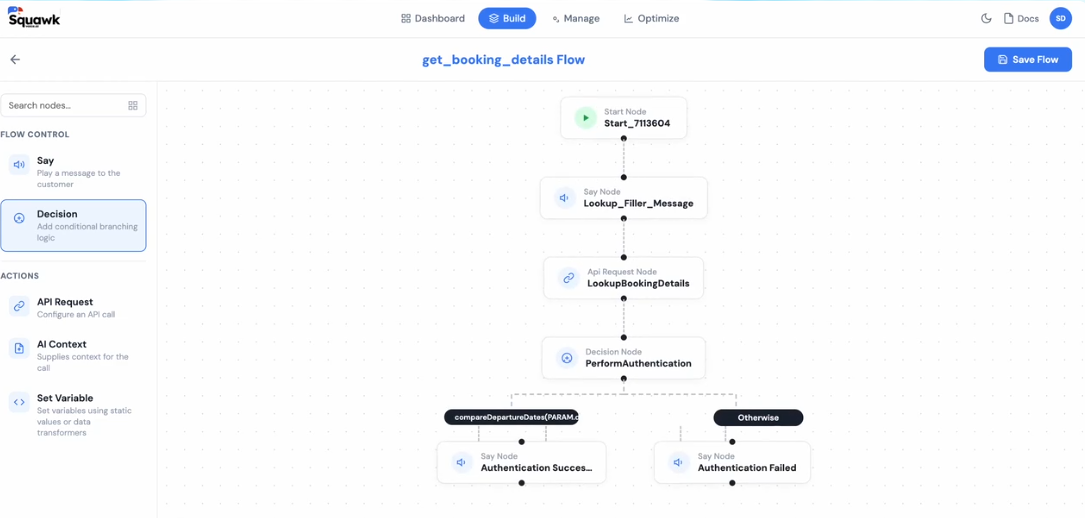
Out-of-the-box readiness: Synthflow is a builder: you design your agent, configure the flows, and tune it until it works. SquawkVoice ships production-ready agents. For a dental office or HVAC contractor, that difference is weeks of setup time.
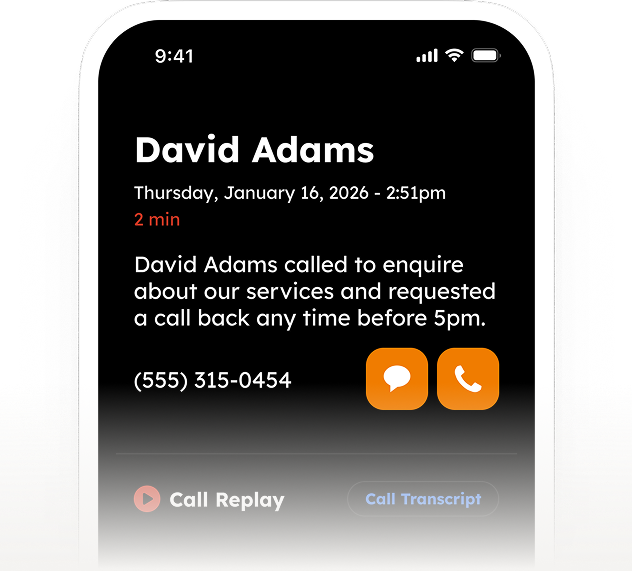
Post-call visibility: Synthflow gives you transcripts. SquawkVoice provides recordings, transcripts, structured summaries, and logged actions for every call, with no customization required. If your team needs to know what happened on a call without reading the full transcript, that gap matters daily.
Analytics tied to outcomes: Synthflow's analytics don't surface actionable outcomes out of the box. SquawkVoice tracks outcomes, actions taken, and resolution trends, and gives leadership a granular view of call-resolution data rather than just a holistic agent overview.
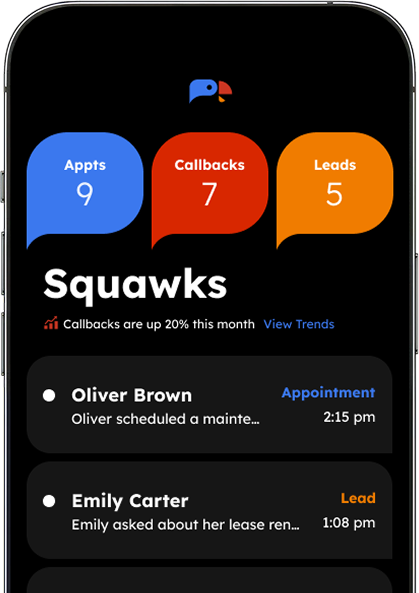
UX and agent management: Synthflow's menus are crowded and require help documentation to navigate. SquawkVoice groups menus intuitively and shows all agents in an icon view at a glance. If you're managing multiple agents across locations, that saves real time.
See how SquawkVoice handles your call types out of the box
Request a Demo →
Key features that matter in real work
No-code agent builder
The drag-and-drop builder is Synthflow’s biggest selling point. You select a voice, write a prompt, configure actions (book an appointment, transfer a call, send an SMS), and deploy. G2 reviewers consistently call the setup “intuitive” with 350+ mentions of ease of use. For simple inbound/outbound flows, you can have an agent live within 30 minutes.
The builder supports conditional logic (if caller says X, do Y), which makes conversations feel more natural than rigid IVR menus. Advanced branching with dynamic variables gets clunky, though. If your workflow has more than 3–4 decision branches, expect to spend time debugging.
User reviews give a clearer picture. Setup was rated as “no-code builder; setup effort increases with workflow complexity,” and workflow design was categorized as “needs technical expertise.” The menu options were described as “not arranged intuitively” and “look more crowded.”
Voice quality and latency
Synthflow advertises sub-400ms latency, and on higher-tier plans with priority processing and regional routing, it delivers on that promise. Voices sound natural. Users on G2 and Trustpilot frequently describe them as “human-like.” You get 1,000+ voice options through ElevenLabs integration with controls for patience level, speech speed, volume, and stability.
The catch: lower-tier plans without priority processing can experience latency spikes during peak hours, and longer conversations sometimes degrade in quality. Gartner Peer Insights reviewers note occasional mispronunciation of names and words.
Inbound and outbound call handling
Synthflow handles both directions. Inbound agents answer calls, qualify leads, route to human agents, and handle FAQ responses. Outbound agents run automated campaigns — you upload lead lists, set time zone rules, and the AI dials through them.
Voicemail detection and call transfer are built in. Synthflow's standard call actions include Real Time Booking, Call Transfer, Information Extractors, Custom Evaluations, Send SMS, and Custom Actions. The outbound campaign features are a real strength for sales teams, though the inbound side lacks the depth of dedicated receptionist platforms when handling multi-step service workflows.
Platform comparisons rate Synthflow's autonomous resolution as "depends on user flow design and integrations," meaning the quality of inbound call handling is directly tied to the effort put into building the flows. Compare that to platforms rated as “built for autonomous resolution of routine and multi-step issues” out of the box.
Integrations and CRM sync
Synthflow connects with 200+ tools through native integrations and Zapier. HubSpot, Salesforce, GoHighLevel, Stripe, Cal.com, and Twilio are the most used. Call data, transcripts, and lead information sync automatically.
Multiple user reviews note that while integrations are available, calendar integrations, in particular, are not straightforward, and some require additional subscriptions. Bidirectional data flow (pulling customer account data into the conversation in real time) requires more configuration than the no-code builder handles cleanly.
Appointment scheduling
Calendar integration is one of Synthflow’s stronger features. The AI checks availability, books appointments, and sends confirmation messages — all during the call. Cal.com and GoHighLevel are pre-built integrations. Other calendar apps connect through Zapier or API.
Multilingual support
Synthflow supports 20+ languages with multiple accent options for English (American, British, Australian). For businesses serving multilingual communities, this is a practical advantage over platforms that only support English and Spanish. SquawkVoice matches this with 30+ languages.
Post-call visibility: the gap that matters
This is where Synthflow’s builder-first approach creates a real operational gap. Platform comparisons show the following breakdown:
Source: SquawkVoice competitor analysis, Synthflow Raw Data, and evaluation sheets (2025)
The pattern is consistent: Synthflow gives you the raw data (transcripts) but not the structured intelligence (summaries, actions, outcome tracking). Your team has to manually review transcripts to extract what happened on each call — or build the summarization yourself. The no-call recording finding is particularly notable. If your compliance or QA process requires recordings, that’s a gap you’ll need to work around.
AI capabilities (what it can and can’t do)
AI for call handling and qualification
For routine calls: answering FAQs, qualifying leads, and capturing contact information, the AI performs well. GPT-4o gives it strong contextual awareness for standard conversations. The information extraction feature captures specific data points (name, company size, pain points) and pushes them to your CRM.
AI for outbound campaigns
The outbound engine is where many teams get the most value. Upload a lead list, set calling windows by time zone, and the AI works through it. It handles objections, detects voicemails, and schedules follow-ups. Sales teams using GoHighLevel or HubSpot benefit from the tight CRM sync.
Where AI still struggles
Off-script moments are the weak point. When callers go off-topic or interrupt, the AI can lose context and loop back to canned responses. Complex multi-step workflows with dynamic variables are harder to debug than the no-code interface suggests. And like all LLM-powered agents, hallucination risk exists when the knowledge base doesn’t have a clear answer.
Synthflow applies strict guidelines to enforce appropriate behavior and reduce hallucinations. The effectiveness of those guidelines depends entirely on how well they've been configured, which loops back to the setup effort trade-off.
Synthflow pricing overview
Synthflow now offers two pricing paths: Pay-as-you-go (component-based billing) and Enterprise (custom pricing for 10,000+ minutes/month). The older tiered plans (Starter at $29/month, Pro at $99/month, Growth at $449/month, Agency at $899/month) have been removed.
For the full breakdown, see our dedicated Synthflow pricing analysis.
What pricing depends on
Your per-minute cost is the sum of three components: voice engine ($0.09/min), LLM ($0.02–$0.05/min), and telephony ($0.00–$0.02/min). Most pay-as-you-go setups fall between $0.15 and $0.24 per minute. Add Performance Routing ($0.04/min) and Low Latency Edge ($0.04/min), and a $0.11/min configuration becomes $0.19/min.
Phone numbers cost $1.50/month each — every agent needs one. White-label tools cost $2,000/month on a pay-as-you-go basis (included with Enterprise).
What’s typically included in higher tiers
Enterprise adds custom per-minute rates (as low as $0.07–$0.08/min at high volumes), unlimited concurrent calls (vs. 5 on pay-as-you-go plans), SIP trunking, white-label and reseller tools, HIPAA compliance, a 99.99% uptime SLA, and a dedicated solution architect.
Usability and setup experience
How fast can you get an agent live?
Fast. A basic inbound agent who answers FAQs and books appointments can be deployed in 30 minutes or less. The template library helps — you pick an industry template, customize the prompt, connect a phone number, and test. Unlimited agent creation across all plans lets you experiment freely.
Flexibility vs. no-code limits
The visual builder works well for straightforward call flows. But when you need advanced branching, passing data between multiple systems during a call, or building complex escalation rules, the no-code interface starts feeling rigid. Users on G2 note “limited customization” (35 mentions) as a recurring concern.
Platform comparisons surface a related UX gap:
Source: SquawkVoice competitor analysis, Synthflow Raw Data evaluation (2025)
Synthflow wins on knowledge base input flexibility (PDF, document, URL) and matches on agent duplication. SquawkVoice wins on menu organization, agent list management, and auth profile options. For teams managing multiple agents across locations, these UX gaps compound into real-time costs.
Real use cases (where Synthflow works well)
Appointment scheduling and booking
Clinics, salons, and service businesses handling high booking volumes. The calendar integration checks availability, books the slot, and sends confirmation without a human.
Lead qualification and sales outreach
Sales teams running outbound campaigns. Upload leads, set qualification criteria, and let the AI work the list. Data flows to CRM for follow-up.
Customer support and FAQ handling
Repetitive inbound questions: hours, pricing, directions, service areas. The AI answers instantly and routes complex issues to humans.
Agency white-labeling
Agencies reselling voice AI to clients. Sub-account system and white-label branding let you offer AI phone agents under your own brand. This is Synthflow’s strongest competitive moat — SquawkVoice doesn’t offer white-label features.
Pros and cons (honest summary)
Pros
- No-code builder gets agents live fast — under 30 minutes for basic flows
- Voice quality sounds natural, especially on higher-tier plans (1,000+ voice options via ElevenLabs)
- 200+ integrations, including HubSpot, Salesforce, GoHighLevel
- Unlimited agents on all plans — great for testing and iterating
- Multilingual support (20+ languages) with accent options
- The white-label and sub-account system works well for agencies
- SOC 2, HIPAA, and GDPR compliance on the Enterprise plan
- Built-in testing and simulation tools before go-live
- Call forwarding is straightforward to configure
Cons
- Pricing escalates at scale; component-based billing with add-ons pushes costs past headline rates
- .Customer support is slow (multiple Trustpilot, G2, and Product Hunt complaints)
- No call recordings on standard plans — transcripts only
- No actionable post-call summaries or structured actions unless you build them yourself
- Analytics tied to outcomes are not available out of the box
- Off-script call handling and complex branching are weak points
- Menu options not arranged intuitively; agent list view lacks icon overview
- Calendar integrations are “not straightforward”.
- Lower-tier plans gate key features (priority latency, compliance, advanced workflows)
- Phone numbers limited to the US, Canada, Australia natively (others require Twilio)
- Lead tracking is not available in the platform
- Workflow design requires technical expertise beyond basic flows
Synthflow vs. SquawkVoice: which AI voice agent wins in 2026?
We ran a head-to-head comparison across 18 capabilities. Here’s the summary:
Source: SquawkVoice competitor analysis, Synthflow evaluation sheet, Marketing Comparison (2025)
Which is better for quick setup?
Both are fast. Synthflow’s template library gets outbound and inbound agents up and running in about 30 minutes. SquawkVoice’s mobile app gets an AI receptionist running in minutes — closer to 5 than 30. For SMBs that want the fastest path to “phone answered by AI,” SquawkVoice has the edge.
Which is better for pricing transparency?
SquawkVoice charges a flat $0.20/min with no platform fees and 50 free trial calls. Synthflow’s component-based billing means you’re adding voice engine, LLM, and telephony, then potentially adding Performance Routing and Low Latency Edge. A configuration that starts at $0.11/min can reach $0.19/min with both add-ons. If predictable budgeting matters, SquawkVoice is more straightforward.
Which is better for SMBs?
SquawkVoice is built for SMBs — the mobile app, simple setup, flat pricing, and focus on inbound call handling (answering, qualifying, booking, routing) fit the workflow of dental offices, HVAC companies, and service businesses. Synthflow skews toward agencies and mid-market teams that want outbound campaign tools and white-labeling.
The marketing comparison matrix confirms this: SquawkVoice scored “Yes” on out-of-box readiness, ease of setup, post-call visibility, and overall UX. Synthflow scored “No” for readiness and UX, and “Partially” for setup and post-call visibility.
Source: SquawkVoice marketing comparison matrix (2025)
Best alternatives to consider
If you want a simpler setup with a mobile app
SquawkVoice — AI receptionist with mobile app management, flat per-minute pricing ($0.20/min), 30+ languages, native Freshworks integration, and 50 free trial calls. Built for service businesses and SMBs.
If you want developer-first control
Retell AI — Modular pay-as-you-go from $0.07/min. Bring your own LLM and telephony. SOC 2 and HIPAA compliant. Vapi — Full BYO stack with 100+ languages and $0.05/min platform fee. Maximum flexibility.
If you need enterprise-scale outbound
Bland AI — Up to 1M concurrent calls, custom voice models, $0.09/min. PolyAI — Managed enterprise deployments from ~$150K/year. Pre-trained industry assistants with 99.9% uptime SLA.
How to decide (simple checklist)
- Call volume: Under 200 calls/month? Synthflow’s per-minute costs may exceed the value. Look at flat-rate alternatives.
- Budget: Need a predictable monthly number? Consider SquawkVoice ($0.20/min flat) or Dialora.
- Technical skills: Non-technical? Synthflow’s builder works for simple flows. Need advanced customization? Try Retell AI or Vapi.
- Inbound vs. outbound: Primarily answering calls? SquawkVoice fits better. Heavy outbound? Synthflow or Bland AI.
- Post-call data: Need structured summaries and outcome tracking? SquawkVoice includes this. Synthflow doesn’t.
- Compliance: HIPAA/SOC 2 only on Synthflow’s Enterprise plan. Check if alternatives include it at lower tiers.
- White-labeling: Reselling to clients? Synthflow’s agency tools are a strong option.
Conclusion
Synthflow is a capable no-code voice AI platform that works well for agencies, mid-market sales teams, and businesses with the budget to manage component-based pricing. The visual builder is easy to start with, voice quality is solid on higher plans, and the integration ecosystem is broad.
Where it falls short: pricing unpredictability at scale, slow customer support, missing call recordings on standard plans, no structured post-call summaries or outcome analytics out of the box, and UX complexity that grows as your agent count increases. The “no-code” label is accurate for simple flows but misleading for anything beyond basic branching.
SMBs seeking simple, always-on phone answering with structured post-call data should consider SquawkVoice. Developer teams wanting more control should try Retell AI or Vapi.
Your Business Never Misses a Call Again. Learn How.
Request a Demo →
Frequently asked questions
Is Synthflow worth it in 2026?
For agencies and mid-market teams running outbound campaigns with 200+ calls/month, yes. For small businesses on tight budgets, the component-based pricing, missing call recordings, and gated features on lower plans reduce the value. Evaluate whether the total cost at your volume makes sense compared to flat-rate alternatives like SquawkVoice.
Does Synthflow have a free plan?
No permanent free plan. Synthflow’s pay-as-you-go tier has no subscription fee, but you pay for every minute of usage plus $ 1.5/h per phone number per month. The previously available Starter plan at $29/month has been discontinued.
How much does Synthflow cost per minute?
Component-based: voice engine ($0.09) + LLM ($0.02–$0.05) + telephony ($0.00–$0.02). Most setups fall between $0.15 and $0.24/min. Add Performance Routing and Low Latency Edge ($0.04/min each), and rates can exceed $0.20/min. Enterprise contracts can reach $0.07–$0.08/min at high volumes.
What’s the difference between Synthflow and SquawkVoice?
Synthflow is a no-code builder for both inbound and outbound voice AI with agency white-labeling. SquawkVoice is an AI receptionist platform focused on inbound call answering with a mobile app, flat $0.20/min pricing, native integrations (including Freshworks), structured post-call summaries, and 50 free trial calls. Synthflow suits agencies and outbound teams. SquawkVoice suits SMBs and service businesses.
Can Synthflow handle multilingual calls?
Yes. Synthflow supports 20+ languages, including multiple English accents. SquawkVoice supports 30+ languages. Both are solid for serving multilingual communities.
Does Synthflow include call recordings?
No. Platform comparisons confirm that Synthflow provides transcripts but no call recordings on the standard plan. If recordings are required for compliance or QA, look at SquawkVoice (recordings included on all plans) or Retell AI.