%201.svg)


.png)


It’s 10.41 pm and your business phone rings. A customer needs to reschedule tomorrow’s appointment. The call goes unanswered, and your business, which is still expecting the customer to show up the next day, loses time and money.
Now replay the same moment with an AI voice assistant.
It answers on the first ring and hears, “I need to move my appointment.” It then authenticates the user using a name, email address, or phone number. It checks your calendar, offers two open slots, books the new time, and sends a confirmation text. If the caller sounds frustrated or the request gets complicated, it routes the call to a human and passes a clean summary so nobody has to start from scratch.
Here’s where the real value of an AI voice assistant shows up. It turns missed calls into handled calls, and handled calls into booked appointments, qualified leads, and resolved support tickets.
If you’ve been exploring workflow tools like N8N, this is where things get practical. A modern voice assistant is a conversational layer on top of workflows. The voice assistant decides what should happen, and your workflow engine (N8N or your backend) executes it. The workflow could create a lead in your CRM, check inventory, schedule a job, trigger a refund flow, or notify an on-call team.
How Does AI Calling Work?
Before we go into how to build an AI voice agent, let’s understand how it works. From the caller’s perspective, it’s a phone call. Under the hood, several things happen in under a second each time they speak.
- The call connects via your telephony provider. The audio stream is routed to the speech-to-text (STT) engine in real time.
- The STT engine transcribes the caller's speech and sends the text to the language model.
- The LLM processes the input within the context of the conversation history and the business’s configured knowledge, policies, and data sources.
- An alternative way is for the call to be directly handled by LLM without STT and TTS and this is increasingly happening with Voice LLMs improving accuracy
- If the agent needs to take an action (Check a calendar, look up an order, create a CRM record), it calls the appropriate API and incorporates the response into its answer.
- The text response is passed to the text-to-speech (TTS) engine, which converts it to natural-sounding speech and plays it back to the caller.
- This loop continues throughout the call. If an escalation trigger fires, the agent initiates a warm transfer to the human agent, attaching the conversation context.
The latency across this chain is the main technical challenge. Each component adds delay, and the combined delay must stay below the threshold. Leading platforms achieve this by running STT and initial LLM inference in parallel where possible, and by using streaming TTS (which starts speaking before the full response is generated).
Types of AI Voice Assistants
Before you write a single line of code, you need to decide what kind of voice assistant you’re building. The architecture, tools, and complexity vary significantly depending on the use case.
Task-Oriented Voice Agents
These handle a specific, bounded set of actions: booking appointments, checking order status, answering FAQs, or collecting intake information. They’re the easiest to build well because the scope is narrow and the success criteria are clear.
Conversational Support Agents
These agents handle a broader range of support queries, understand context across a conversation, and know when to escalate to a human. They’re the backbone of Tier 1 call deflection for mid-market companies.
Outbound Voice Agents
These initiate calls rather than receive them — for appointment reminders, follow-ups, payment nudges, or lead qualification. They’re powerful but come with more regulatory considerations (consent frameworks, opt-out handling).
Hybrid/Full-Stack Voice Agents
These combine inbound handling, live system lookups, escalation logic, and outbound follow-up in a single platform. For most growing businesses, this is where you eventually end up, but you don’t have to start here.
Step-by-step Process to Build an AI Voice Agent
Thanks to AI coding agents, no-code development is on the rise. But before you generate a single line of code, you need to align your business processes with the outcomes you want.
Step 1: Choose One High-Volume Use Case You Can Fully Resolve
Start narrow. Pick a call type that is predictable, low-risk, and valuable. It should be something you can define clearly as "Resolved." If you can't define the finish line, don't automate it first. Good starting points:
- Appointment booking: Caller picks a time, the AI voice assistant checks availability, confirms, and sends an SMS.
- Order status lookup: Caller provides an order number, the AI voice assistant pulls live data from the order management system, and reads it back
- Lead intake: Caller describes what they need, the AI voice assistant asks qualification questions, and creates a CRM record.
Step 2: Write the Call Flow Like a Map, Not a Script
This is where you map out what the agent should do in every scenario: The ideal path, edge cases, unclear inputs, and escalation triggers.
Platforms like N8N are useful here, as you can visually build multi-step workflows that connect the voice agent to external systems (Calendar APIs, CRM webhooks, knowledge bases) without writing boilerplate integration code.
Nodes for HTTP requests, conditional logic, and data transformation map cleanly onto typical voice agent flows.
Under each state, define what must be true before moving forward. The examples below are logical next steps to the examples in the above step:
- Appointment booking: Intent capture is complete when we have the job type and a preferred time window.
- Order status: Verification is complete when the caller's phone number or order number matches a record.
- Lead intake: Resolution is complete when the CRM record exists, and the caller has been given a callback timeframe.
A good call flow is a sequence, not a word-for-word script. A clean baseline looks like this:
Step 3: Decide Your Build Path
There are three approaches based on your budget, bandwidth, and level of expertise.
- No-code/Low-code: Fast to prototype, great when your flows are simple, and you can live with limitations around integrations, reporting, or control.
- Hybrid (recommended for most teams): Use a voice layer for real-time conversation and connect it to workflows for actions. This is where tools like N8N commonly fit. The assistant triggers workflows via webhooks, which then hit your calendar, CRM, help desk, or database.
- Fully custom engineering: This offers flexibility, but comes with responsibility. Your team has to maintain telephony, audio streaming, model orchestration, monitoring, and security. Worth it when voice is core to the product, not just an internal tool.
- Production-ready platform: Deploy a production-ready AI voice assistant by configuring it around your business, not building from scratch. You define your services, connect your calendar or CRM, set your call flows, and go live. No developer required for day-to-day changes, no infrastructure to maintain, and no scrambling when something breaks. This approach trades maximum flexibility for speed, reliability, and a much lower operational burden.
If you’re keen to build your first voice assistant, the hybrid approach usually offers the best balance of speed and reliability.
Step 4: Build the Voice Pipeline
A phone-based assistant needs four core components working in sequence:
- Telephony: Handles phone numbers and routing (e.g., Twilio, Vonage, SIP providers)
- Speech-to-Text (STT): Converts the caller’s audio to text in real time (e.g., Deepgram, Google Cloud Speech, AssemblyAI)
- Language Model (LLM): Processes the text, determines intent, and decides what to do next (e.g., ChatGPT, Claude, Gemini)
- Text-to-Speech (TTS): Converts the response back to natural-sounding audio (e.g., ElevenLabs, OpenAI TTS, Google WaveNet)
- Voice to Voice LLM: Alternative way to STT→LLM→ TTS is Voice→Voice LLM where voice input is answered by LLM and is streamed out as audio
The most important practical constraint is latency. People tolerate a second of silence, but they do not tolerate five. Design for fast responses, even if that means the assistant says "One moment, checking that now" while it processes.
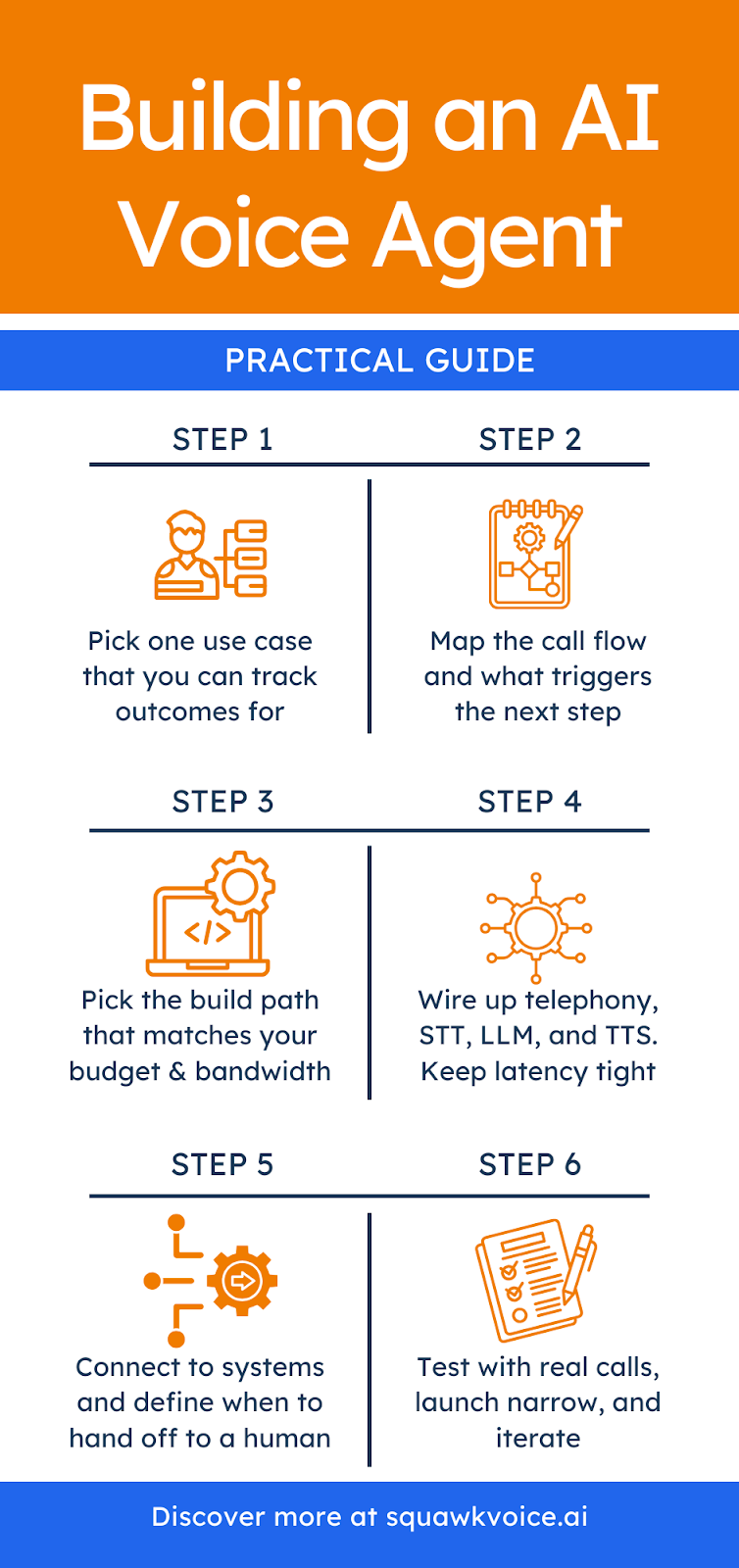
Step 5: Give the Assistant Tools So It Can Take Action
A voice assistant becomes useful when it can talk and execute actions. Think of each action as a tool the assistant can call. Taking the example of an inbound receptionist, the first tools are usually:
- Check availability: Return open slots for a requested date range
- Book or reschedule: Write changes to the calendar and confirm details
- Create lead or ticket: Capture structured fields and log the outcome
- Escalate with a summary: Transfer to a human with the reason and conversation context
In a hybrid setup, each tool call maps to a workflow. The workflow engine receives the request, performs the steps, and returns the result so the assistant can convey it to the customer. This separation also keeps the system maintainable; you can add new tools later without rewriting the conversation engine.
Step 5: Add Guardrails for Verification, Privacy, and Failures
If your assistant touches sensitive information, factor safety into the flow. Require verification before account-specific actions, define what can be done without verification, and specify the failure behavior when your systems are slow or down.
Define the conditions that trigger a handoff to a human: Complex queries the agent can’t resolve, frustrated callers, VIP accounts, or topics outside the defined scope.
Step 6: Test With Real Calls, Not Just Ideal Prompts
Run tests across:
- Messy audio: Background noise, speakerphone, echo
- Human behavior: Interruptions, change of mind, multi-intent requests
- System or process issues: Calendar conflicts, missing data, API failures
Also test handoffs. A good escalation transfers context so the human can start with: "I see you’re rescheduling your appointment from Tuesday to next week. What day works?" That one sentence is the difference between a good handoff and a frustrated caller who has to repeat themselves.
What Features Should You Include in Your Voice Assistant?
Not every AI voice assistant needs the same feature set. If you're building something meant to handle real business calls, these are the capabilities that separate a useful assistant from one that frustrates callers.
- Low latency: The assistant must respond quickly enough that silence doesn't feel broken. People tolerate a beat, but they don't tolerate five seconds of nothing. Sub-second response is the target.
- Interruption handling: Callers change their minds mid-sentence. The assistant should be able to follow a direction change without getting confused or restarting the conversation.
- Context memory: The assistant needs to remember what was said earlier in the same call. Asking a caller to repeat their name or reason for calling is an immediate trust-breaker.
- Live system lookups: The assistant should pull real data from your calendar, CRM, or order system during the call. Static, pre-loaded answers only get you so far.
- Appointment booking: End-to-end booking within the call itself, including availability checks, confirmation, and an automatic SMS or email sent to the caller.
- Smart escalation: When the assistant can't resolve an issue, it should transfer it to a human with the full conversation summary attached. The caller should never have to repeat themselves.
- Call transcription and recording: Every call is logged as a searchable text transcript and audio recording, available for QA, compliance review, and coaching.
- Multilingual support: The assistant should detect the caller's language and respond in that language, without requiring the caller to navigate a menu to select it.
- Analytics and reporting: The tool needs to capture resolution rate, escalation rate, call volume by time of day, and common call reasons. This data is how you improve the assistant over time.
- CRM and calendar sync: Automatic contact creation, interaction history, and outcome logging written back to your systems after every call. No manual data entry.
What Are the Key Benefits of AI Voice Agents?
The most convincing way to understand the benefits is through what actually changes in daily operations.
- You answer more calls, especially after hours: A surprising number of businesses lose revenue simply because nobody picks up. An AI voice assistant turns missed calls into revenue. For small businesses, this means capturing leads and bookings outside business hours without adding staff. For larger companies, it means peak season doesn’t require emergency hiring.
- You reduce repetitive work without losing the human touch: Humans are best at empathy and judgment. They are not the best at repeating the same five answers all day. When the AI assistant handles repeatable questions, your team gets back time for calls that actually need human involvement. Agents move from reading screens to solving real problems.
- Meaningful cost reduction: McKinsey’s research on gen AI in customer service found that AI tools applied to support operations increased agent issue resolution rates by 14% per hour and reduced time spent on individual issues by 9%. Applying generative AI to customer care functions could increase productivity by 30-45% relative to current costs. At scale, those efficiency gains translate directly to lower cost-per-interaction.
- Consistent customer experience: A well-configured voice agent gives the same accurate answer at call 1 and call 500. No one is having an off day, misreading a policy, or giving outdated information because they missed a training update.
- Scale without adding headcount: With human staffing, scaling is linear: more calls means more people. With an AI assistant, scaling is operational. You improve workflows, expand coverage, and add new intents without hiring a whole new shift.
Why Creating an AI Voice Assistant Is Worth It
Building is especially worth it when calls are directly tied to revenue, retention, or service quality. Common triggers: Missing calls after hours or during peak periods, teams answering the same questions repeatedly, customers abandoning when they hit voicemail or long hold times, and existing systems (calendar, CRM, order management) that can be connected.
The adoption curve for voice AI has moved well past the early adopter phase. McKinsey’s 2025 State of AI report found that 78% of organizations are already using AI in at least one business function. Over 80% of customer care executives are investing in AI or planning to do so. Businesses that move now have a meaningful window to build competency, refine their systems with real call data, and establish workflows before voice AI becomes table stakes.
How Much Does an AI Voice Agent Cost?
Costs vary, but they usually come from telephony minutes, speech services, model usage, and the build effort for workflows, testing, and monitoring. A narrow MVP can be less expensive than the cost of even one additional staff member. Production quality typically costs more because reliability and QA matter once real calls are on the line.
The table below captures approximate costs of building and maintaining an AI voice agent.
Assumptions:
- 5,000 calls/month
- 3-minute average duration
- 15,000 minutes/month
- 1 mid-level US-based engineer
- Production-ready MVP
- Sources: Twilio and other mentioned vendors
How Long Does it Take to Build an AI Voice Agent?
A narrow, well-scoped assistant moves fast. A system with multiple intents, deep integrations, and production-grade reliability takes longer, and rushing it is one of the most common reasons voice projects underdeliver.
Here's a rough breakdown by phase:
- MVP (One or two use cases, basic flow): A few days to two weeks with a hybrid approach. You're testing whether the assistant can handle the core interaction, not whether it's bulletproof.
- Integration work (Calendar, CRM, OMS): One to three weeks, depending on how well-documented your APIs are and how many systems you're connecting.
- QA and real-call testing: Takes a week or two. This is where you find out what your test scripts missed: background noise, interrupted requests, API timeouts, edge cases.
- Production readiness (Multiple intents, escalation, monitoring): Four to 12 weeks total from start to a system you'd trust with every inbound call.
What slows teams down most:
- Underestimating integration complexity with legacy systems
- Skipping proper escalation design until late in the build
- Testing only with clean, scripted inputs
- Scope creep: adding new intents before the first one is solid
Navigating the Build vs. Buy Decision
This is a business decision about where you want to spend time and carry risk.
Reasons to build:
- Voice is a core part of your product, not just an operational tool.
- You need full control over the conversation engine, data handling, or model behavior.
- You have engineering capacity and are comfortable owning infrastructure in the long term.
- Your use case is genuinely unusual, and no existing platform covers it well.
Reasons to buy:
- Your goal is to stop missing calls or reduce support costs, not to build voice technology.
- You don't want a developer on call every time a flow breaks or an integration needs updating.
- You need to move in days, not months.
- You want pre-built connectors, compliance coverage, and a support team behind the product.
What Next?
The middle ground most businesses land on: Buy the voice infrastructure, customize the workflows. A platform like SquawkVoice handles telephony, speech, latency, and uptime. You configure the call flows, connect your calendar and CRM, and define your escalation rules. You get the speed and reliability of a production system without giving up control over how your business actually runs.
The question to ask yourself is simple: Is building a voice assistant the thing your business needs to be good at, or answering every call? For most businesses, it's the latter.
Want to see an AI voice assistant in action?
Try SquawkVoice
Frequently Asked Questions
What is an AI Voice Assistant?
An AI voice assistant is software that can hold real-time spoken conversations, understand intent, and respond naturally. An AI voice agent usually goes further by taking actions, including booking, routing, looking up data, and creating tickets, through connected systems.
How to build an AI assistant?
Start with a single use case you can fully resolve, like booking or status lookup. Map the call flow, connect it to real actions via workflows or APIs, design escalation behavior, then test with real callers before expanding.
How much does it cost to build an AI voice assistant?
The cost depends on call volume, call length, and the number of integrations you need. Budget for telephony minutes, speech services, model usage, and the build effort for workflows, testing, and monitoring. A rough estimate is $22,000-41,000 one-time costs, and $3,000-7,000 per month in monthly costs.
What are the biggest challenges when building an AI voice assistant?
The biggest challenges are latency across the full pipeline, messy back-end systems that were not built for real-time API access, edge cases in real calls that your test scripts did not cover, and poor escalation behavior that leaves callers stuck. Security and privacy become additional concerns once the assistant handles account-specific data.
How long does it take to build a working AI voice assistant?
A narrow MVP for one or two call types can be built in a couple of days to a couple of weeks. A production-grade assistant with multiple intents, deep integrations, and QA usually takes several weeks, depending on complexity.
What is the difference between a chatbot and a voice assistant?
A chatbot communicates via text; it takes written input and returns written output. A voice assistant handles spoken communication, converting audio to text, processing it, and responding in audio. The underlying language model can be the same. The difference is in the input and output layers. Voice adds the complexity of speech recognition accuracy, latency management, and natural audio output.